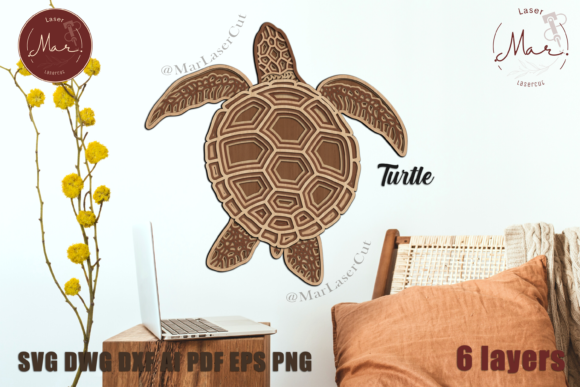
TURTLE 3D Multilayer SVG Laser Cut – A Creative and Practical Design for All Makers
If you're looking for a versatile and engaging project that combines creativity with precision, the TURTLE 3D Multilayer SVG Laser Cut is an excellent choice. This design offers a unique way to bring a 3D turtle to life using laser-cut layers. Whether you're a hobbyist, a professional maker, or someone exploring new creative avenues, this SVG file provides endless possibilities for customization and expression.
Designed for use with a variety of laser cutting machines—including CO2 lasers, Glowforge, and even paper cutters like Silhouette and Cricut—the TURTLE 3D Multilayer SVG is a flexible digital product. It comes in multiple formats such as AI, EPS, SVG, DWG, DXF, PDF, and PNG, ensuring compatibility with most design and cutting software. The final product measures 276 x 277 mm (10.8 x 10.9 inches), making it a perfect size for display or integration into larger projects.
Why Choose the TURTLE 3D Multilayer SVG?
The TURTLE 3D Multilayer SVG is ideal for anyone interested in creating detailed, layered designs. With six distinct layers, it allows for depth and dimension that simple flat cuts cannot achieve. This makes it great for wall art, educational models, or even as part of interactive installations. Its design encourages personalization, whether through painting, staining, or adding textures to match your style or theme.
One of the key advantages of this design is its adaptability. You can choose from a range of materials, including wood, acrylic, metal, cardboard, and colored paper. This flexibility means you can tailor the final product to your specific needs, budget, or aesthetic preferences. For instance, using MDF or plywood gives a sturdy base for painting, while acrylic with glitter adds a touch of sparkle and elegance.
Avoiding Common Mistakes When Using the TURTLE 3D Multilayer SVG
While the TURTLE 3D Multilayer SVG is user-friendly, there are some common mistakes that can affect the outcome. One frequent issue is not following the layer order correctly. Each layer is designed to fit precisely with the others, so misalignment can lead to structural issues or an unbalanced appearance. Always refer to the reference image provided to ensure the correct stacking sequence.
Another mistake is selecting the wrong material for your project. While the design works with many materials, not all are suitable for laser cutting. For example, materials that emit toxic fumes when cut, such as certain plastics, should be avoided. Always check the safety guidelines for your laser machine and ensure the material is compatible with your equipment.
Some users also overlook the importance of testing the design on a smaller scale before committing to a full project. A small test cut can help identify any potential issues with the design, such as overlapping parts or incorrect measurements. This step can save time, materials, and frustration in the long run.
Practical Tips for a Successful Project
To get the best results with the TURTLE 3D Multilayer SVG, start by carefully reviewing the instructions and reference image. Understanding how each layer interacts with the others will help you avoid errors during assembly. If you're unsure about the cutting settings, consult your laser machine’s manual or reach out to the community for advice.
When it comes to painting or finishing the turtle, consider the material you’ve used. Wood may require a primer before painting, while acrylic can be painted directly. Experimenting with different textures, such as sanding, gluing, or using metallic paints, can add visual interest and make your creation stand out.
Finally, don’t hesitate to share your work. The creator of this design encourages users to tag them on Instagram (@marlasercut) to show off their finished products. Sharing your progress not only helps build a community but also inspires others to try the design themselves.
What to Check Before Starting Your Project
Before downloading or purchasing the TURTLE 3D Multilayer SVG, make sure it meets your specific needs. Check the file formats available and confirm they are compatible with your design software and laser cutter. Also, review the recommended materials to ensure they align with your project goals and resources.
Consider the size of the final product and whether it fits your intended use. If you’re planning to display the turtle, make sure you have enough space. If it’s part of a larger installation, verify that the dimensions will work within the overall design.
Lastly, think about the time and effort required. While the design is straightforward, assembling six layers can take some time, especially if you’re new to laser cutting. Plan accordingly and allow yourself enough time to complete the project without rushing.
Final Thoughts
The TURTLE 3D Multilayer SVG Laser Cut is a fantastic resource for creators of all skill levels. Its versatility, ease of use, and potential for personalization make it a valuable addition to any maker’s toolkit. By avoiding common pitfalls and following practical tips, you can ensure a successful and satisfying project.
Whether you’re looking to create a unique piece of art, a functional model, or a fun DIY project, the TURTLE 3D Multilayer SVG offers a rewarding experience. Follow @marlasercut on Instagram to stay updated on new designs and see how others have brought this turtle to life. With the right approach, your TURTLE 3D Multilayer SVG can become a standout creation that reflects your creativity and craftsmanship.