Pinecone 3D Papercraft: A Creative Solution for Holiday and Nature Decor
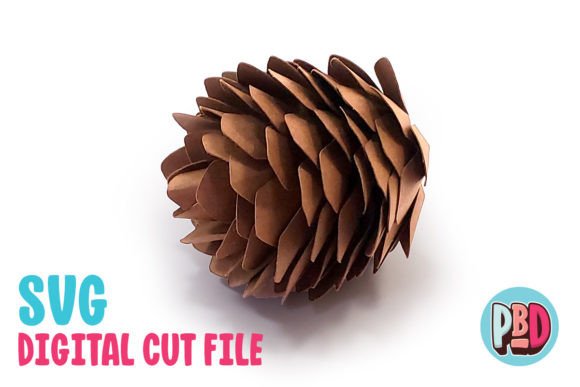
If you're looking for a unique way to add a touch of nature to your home or event spaces, Pinecone 3D Papercraft offers an innovative and easy-to-use solution. This papercraft design transforms simple cardstock into a realistic pinecone that can be used in a variety of decorative applications. Whether you're crafting for the holidays, creating a nature-themed centerpiece, or making a wreath, Pinecone 3D Papercraft provides a practical and visually appealing option.
The Pinecone 3D Papercraft is designed to be built using medium to heavy cardstock, which ensures durability and a professional finish. The finished piece measures 2.5 inches in length and 2 inches in width and depth, making it ideal for table decorations, wreaths, and other seasonal displays. Its compact size allows for versatility, as it can be incorporated into larger projects or used as a standalone accent.
One of the key benefits of this papercraft design is its ease of use. The package includes a ZIP file with SVG and DXF cut files, along with PDF instructions, providing everything you need to get started. These digital files are compatible with popular cutting machines like Silhouette and Cricut, making it accessible for crafters of all skill levels. However, there are some important considerations to keep in mind when working with these files to ensure the best results.
Understanding the Files and Software Requirements
The Pinecone 3D Papercraft download includes two main file types: SVG and DXF. SVG (Scalable Vector Graphics) files are widely supported and work well with software such as Silhouette Designer Edition and Cricut Design Space. These files are typically easier to work with and produce cleaner results. On the other hand, DXF (Drawing Exchange Format) files are compatible with Silhouette Basic Edition, but they require specific settings to function properly.
When using DXF files in Silhouette Studio, it's essential to adjust the preferences to ensure the design loads correctly. Follow these steps: go to Edit Preferences, select Import DXF, and change the setting from “As-is” to “Centered.” This adjustment helps align the design properly and prevents any issues during the cutting process. Keep in mind that DXF files may open more slowly and appear less clean compared to SVG files, so it's recommended to use SVG files whenever possible.
Before starting your project, make sure to extract all files from the ZIP folder. This step is crucial, as the files will not work if they remain compressed. Once extracted, you can import the SVG or DXF file into your preferred software and begin preparing the design for cutting.
Practical Applications of Pinecone 3D Papercraft
The Pinecone 3D Papercraft is incredibly versatile, making it a valuable addition to any crafter’s toolkit. One of the most common uses is as a holiday decoration. During the fall and winter seasons, pinecones are a popular symbol of nature and warmth, and this papercraft design allows you to incorporate that theme into your home without the need for real pinecones. You can place them on tables, hang them from mantels, or integrate them into wreaths for a rustic, handmade look.
In addition to holiday decor, Pinecone 3D Papercraft is perfect for nature-themed projects. Whether you're creating a floral arrangement, a centerpiece for a garden party, or a display for a nature-inspired event, the papercraft adds a tactile and visual element that enhances the overall aesthetic. Its realistic texture and shape make it stand out among other paper crafts, offering a level of detail that is both impressive and functional.
Another practical application is in custom gift-making. By incorporating Pinecone 3D Papercraft into gift boxes, cards, or wrapping paper, you can create a unique and personalized touch that reflects your attention to detail. This makes it an excellent choice for those looking to add a special flair to their gifts or to offer handmade items for sale.
Considerations for Different Users
While Pinecone 3D Papercraft is a great resource for many crafters, different users may approach the project in unique ways depending on their skills, tools, and goals. For example, beginners may find the PDF instructions helpful, as they provide clear guidance on how to assemble the papercraft. More experienced crafters, on the other hand, might experiment with different colors, textures, or materials to create a one-of-a-kind design.
Additionally, users who have access to advanced cutting machines may choose to customize the design further by adjusting the scale or adding additional elements. Others may prefer to use the papercraft as part of a larger project, such as a mixed-media collage or a three-dimensional sculpture. The flexibility of the design allows for creative exploration while still maintaining its core functionality.
It's also worth noting that the type of cardstock used can affect the final outcome. Medium to heavy cardstock is recommended for optimal results, but some crafters may opt for alternative materials, such as felt or fabric, to achieve a different look. Experimentation can lead to new ideas and unexpected results, making the Pinecone 3D Papercraft a valuable tool for creative expression.
Conclusion
Pinecone 3D Papercraft offers a practical and artistic solution for those looking to enhance their holiday or nature decor. With its easy-to-use digital files, clear instructions, and versatile applications, it’s an excellent choice for crafters of all experience levels. Whether you’re creating a festive centerpiece, a nature-themed display, or a custom gift, this papercraft design provides a reliable and visually appealing option.
By understanding the requirements for using the SVG and DXF files, and considering the various ways to incorporate the design into your projects, you can maximize the potential of Pinecone 3D Papercraft. Its combination of functionality and creativity makes it a valuable resource for anyone interested in paper crafting and decorative arts.